 Viseum AI Surveillance Video Monitoring Software

One Viseum camera does the work of 6 constantly manned cameras, a Metropolitan Police surveillance officer reported. Read the report
AI Facial Recognition Software from Viseum
“Viseum’s facial recognition system has become essential for daily life, just as Automatic Number Plate Recognition (ANPR) has.” Viseum Face Recognition Software Technology Services Human-Centred Face Recognition AI Software Technology Services.

“The best face recognition software.” (Metropolitan Police)
Following one person through standard and Viseum IMC cameras
A Viseum IMC camera picks one person out of a crowd and follows them from camera to camera, beside a fixed standard camera that cannot.
Read the step-by-step description
Cameras 1 and 3 are standard cameras with a fixed view: each sees only what is inside its cone, narrow close to the camera and wide across the far sidewalk. Cameras 2 and 4 are Viseum IMC cameras: each sees all round, and zooms in on one person at a time, the narrowed view drawn on the street, following them until a usable face is captured. Everyone who walks into a camera's view is boxed in the street view, appears in that camera's view below, and is profiled straight away in the panel on the right, so the three always agree; when several people are in view the panel cycles through them. Find: camera 1 picks the suspect in the red jacket out of the crowd and builds a profile of clothing, height, build, hair, bag and walk. Between cameras the suspect is out of sight and the profile is held. Faces are captured whenever a camera sees one and are shown as a face-recognition system sees them, not as pictures: 68 landmark points on a face mesh, how far the head is turned, and a quality score. A side view, eyes under a cap or a head looking down is too poor to compare; only a full face is turned into a template and compared with the authorised watch-list, and anyone below the alert level is a no-match whose template is deleted at once, as in UK police live facial recognition. Fix: Viseum IMC camera 2 zooms in on selected people in turn; the suspect's full face scores above the alert level and matches the profile, so the suspect is confirmed, while every other face is a no-match and is deleted. A zoom cannot see eyes under a cap, so that face stays too poor to compare. Standard camera 3 sees only a turned face and re-identifies the suspect by profile. Viseum IMC camera 4 zooms in on the suspect only, to reconfirm the re-tracking by face. Follow: the profile is handed on from camera to camera. The alert level of 0.60 is the default setting of a leading police face-matching system (National Physical Laboratory, 2023); the other scores shown are examples.
Global F3 Find, Fix and Follow
One suspect, from a plate read in a city to detention at a border. Each step is found, fixed and followed, and a person confirms before anyone acts.
See Viseum Global F3 Find, Fix and Follow
Read the step-by-step description
A suspect vehicle drives into City A, watched by Viseum 360-degree and fixed cameras, among ordinary traffic. The bar along the top shows the stage: find, fix, follow. The strip along the bottom names where we are (for example City A, Station, Main Street), with the camera or source that has the person and the time; once the view moves in, the inset in the top corner shows the whole city with a gold rectangle for the part in view. Four moments slow down and zoom in: the face captured through the windscreen while the car is held in queuing traffic at a junction, and identified against the watch-list as wanted; the operator confirming the match from the line of look-alikes; the person lost inside a building, every exit watched, and, after changing clothes inside, re-identified on the way out: a card shows the watch-list profile (red jacket) beside what camera 14 sees (grey jacket), and ticks face, build and height, the backpack and the phone data in turn, marks the jacket as changed, and updates the profile; and the switch to a new car, when a drone takes over. Find: the number plate is read on the move; it belongs to a white Nissan Patrol but the car is a black Toyota Camry, so the car is flagged. The crosscheck appears over the bottom right, so the map stays clear. Fix: on foot among people who look alike, the cameras turn to each look-alike in turn and score it as they look (violet circles); the closest scores are listed, and one best match goes to the operator, who confirms it. Follow: each camera hands over to the next with a gold token. Police are told at once, but in a crowded city they follow at a distance and wait for a safe place to stop the suspect, so the cameras keep the suspect in sight for them; the second half shows where that happens. When line of sight is lost, dashed routes run to the cameras the person could reach next; the route to the camera where they reappear turns solid and the others fade. Cameras cannot see through high-rise blocks, only along streets and across open spaces. Each source is shown on the map where its information comes from, and its place on the Global F3 ring lights as it reports: a public post placing them in the area, a database record of past events on this route, a shop's own camera, shared live with the city network under a registered partner programme (as Dubai's Oyoon programme links private-sector cameras) and matched by the suspect's profile, the phone mast whose network data, where lawfully provided, places them inside the building, the vehicle crosscheck of the new car, and the drone. On the right, each source lights as it reports, the match level rises and falls with what is known, the newest finding sits at the top and command control shows which alerts went out. At the end the whole route is drawn in gold and the car, with the drone above it, leaves City A at the edge of the map. The match levels and scores shown are examples. Command control shows how each alert is used: the operator's alarm and the video wall in the control room, the patrol's handheld app (live view, photo and route) and the police radio for the officers on the ground, and the case file, which keeps every image and finding as evidence.
The suspect then drives away. In a slow moment at the city limit, the drone, which flies over City A only, hands the car to the first highway camera with the usual three beats (the drone glows, a gold token passes, the camera glows) and turns back. The same city then pulls out into its place on a simplified map of a real coastline and border, with no real names. Between the highway's cameras the car is unseen, so Global F3 weighs four possibilities, each drawn as a dashed blue route: the car hides in City A, or it heads for City B, the airport or the border crossing. City A's control room watches its parking areas and garages for the hiding case, and the profile, face and plate are sent ahead to the other three. Each possibility is then settled in turn: the plate read at City B rules out hiding in City A; the airport sighting confirms that route; no sighting back in City B rules City B out; and the border crossing is where the suspect is detained. The bars on the right show where the suspect could be, and the clocks show the journey time and the time since they were last seen. Each re-identification is a slow moment: the view slows down and zooms in. On the coastal highway at the edge of City B, a number-plate camera reads the car's plate in moving traffic (the plate is shown masked); staying in City A falls away and the route to City B turns solid. City A's control room then hands the case to City B's: the first glows, a green token travels between them along a green dotted control room link, the second glows, and the label in the corner of the map changes to the control room now in charge. At the airport entrance, where the airport runs live watch-list matching as Gulf airports do, the suspect is re-identified by face and profile against the authorised watch-list and an operator confirms, and police are sent from inside the terminal, but before they reach the entrance the suspect is back in the car and drives away, still followed by the cameras. With no sighting back in City B, the possible routes narrow to the inland road and the case is handed to the border control room. At the checkpoint the face and the plate are matched against the watch-list, an officer confirms, the lane barrier stays closed, and two officers detain the suspect at the booth and lead him away. He never crosses. Because he was heading for the neighbouring country, its police are then told through INTERPOL, in case accomplices or others are waiting for him on their side; nothing is tracked there. Finally the whole journey is drawn, solid gold where a camera saw the suspect and gold dots where it was worked out, with each hand-off marked by a gold diamond, and the panel sums up the sightings, hand-offs and elapsed time. Throughout, the overview in the corner shows where each close-up sits, and the strip along the top names the place. What each source on the Global F3 dial adds: Vehicles reads every plate and finds that this one belongs to another car; Face confirms the person, and an operator checks every match; Social media, checked under lawful authority, places the person on a street from a public post; Knowledge databases (police records) show the route was used before, so the system predicts where they go next; Partner cameras, a shop’s own cameras shared with the police, keep the follow going; Mobile networks, where lawfully provided, confirm the person is inside a building; and Drones follow from above when the person drives away. The match scores, plate digits and journey times shown are examples.
- Viseum Facial Recognition Software optimises any network of cameras. Automatically detects and recognises faces from short range to long range. Greater distance than any other Facial Recognition Software.
- Reliable face matching and verification in real-world deployments, with accuracy measured against a documented test set.
- Automatically create and grow your secure database of faces and watchlists. From matching just a few hundred faces to recognising many millions in near real time.
Best Face Match Software and Face Recognition Analytics
Our facial recognition software, supplied as part of a Viseum system, can also use our unique long-range 360 Security Camera. The only computer vision camera to automatically capture and analyse faces in all directions at the same time. Up to a complete 360° of highly populated, complex and challenging environments. It uniquely follows people until their faces are captured. It recognises the faces of high-risk suspects, even if they hide their faces when approaching security cameras. Compared to any other camera, just one Viseum camera automatically captures:
“There are virtually unlimited video surveillance applications when trained to use Viseum’s Video Software Analytics. When using Viseum F3 cross-checking software with Viseum Face Recognition Software Technology Services, authorised operators can locate and follow a person on an approved watchlist.” (President of the Viseum UK Group and CEO of Viseum International Limited)
 Viseum ethical AI video surveillance targets people by their location and behaviour, not by the way they look.
Learn More »
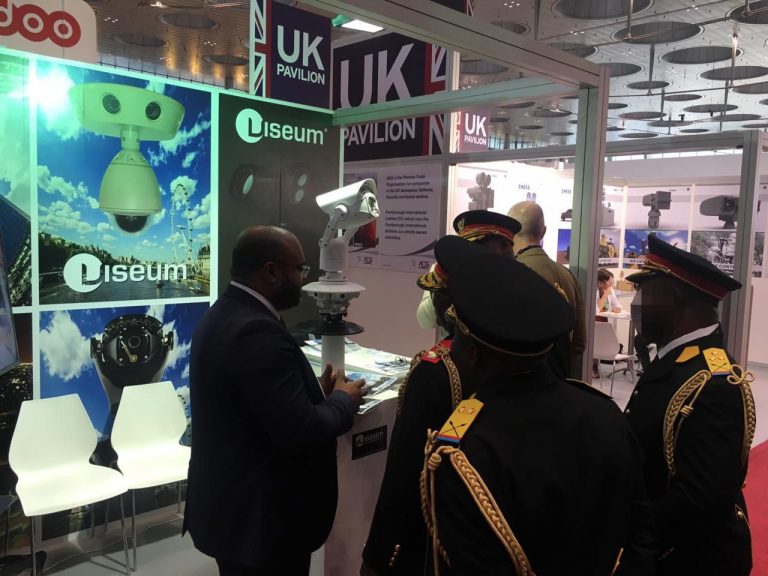 Captures 100 times more faces. Over 25 x more usable video. Clears up over 15 x more incidents.
Learn More »
Facial Recognition Software – General use for regional and National Security
Supporting Safe Cities, people can be automatically allocated to and checked against red, black and green security watchlists. The system can alert National Security staff, and people can be followed automatically. Example 1: A VIP or a suspect can be automatically followed through a city. Live incidents and events are sent to security staff as alarms or situational awareness. Example 2: For the most effective Border Security. Allow and disallow people and vehicles through certain areas, without creating delay. The optimised flow of people, vehicles, faces, and identity checks through areas of a security enterprise. Using an effective balance of the remote site’s day-to-day operations and security threats.
Wider uses of face analysis
- Identifying dangerous people who could commit assault.
- Social services can notice the differences between people under their responsibility.
- Supporting authorised safeguarding work with vulnerable families, always confirmed by a trained operator.
Software accuracy – Face Recognition operational performance

Face Matching: 7 pixels between the eyes minimum.
Real-World Environment Test Set: Matching Accuracy, 99.5% under test conditions. Accuracy in operation depends on camera position, lighting and image quality.
Artificial intelligence performance enhancements
Automated alarm reporting is optimised using Viseum iVOS Adaptive Deep Learning Algorithms. This enables operatives to intuitively characterise alarms to automatically adapt the system’s algorithms.
Typical high-security application – Suspicious behaviour
Some of our automated national security Surveillance Technology Strengths are to uniquely match people using different visual biometrics. It cross-checks each match against the person’s actions, locations and access control records, and then follows them automatically. Basic Example: A person walking through a customs border consistently hides their face when passing security cameras. This can be automatically alarmed as high-risk suspicious behaviour. The unique Viseum 360 Security Camera automatically follows them to capture and cross-check their faces against databases of wanted suspects.
Face Recognition Software – Proven out in the field
- The Viseum Face Recognition Software was recently tested by a major financial institution in London. They compared it with another well-known face recognition system they already had in use. This customer highlighted significant advantages, with accuracy, system design and operational benefits of the Viseum Face Recognition Software Technology Services.


- A major international hotel chain in the UK also tested it. The Viseum Face Recognition System was left on 24 hours a day to detect and identify persons entering and leaving their hotel entrances. Viseum automatically captured and re-identified an average of 270,000 faces every 3 days per hotel. It automatically matched captured faces against the hotel’s register of guests. The customer confidently tested a webcam for their hotel’s ATM. In that trial it recognised registered guests at the ATM and flagged all other users for staff to check.
- In a separate shopping centre deployment during a peak trading period, Viseum Face Recognition Software Technology Services re-identified faces across the full range of skin tones present. We test match rates across skin tones under a documented methodology, and we publish that method on request.

Viseum Face Recognition Software Technology Services displayed excellent accuracy for its unique partial face identification capability. Partial face matching is a core part of our approach, and it runs alongside conventional full face matching.
Some select Face Recognition Software Technology Services customer references
Viseum Face Recognition Software Technology Services is currently in use in various parts of the world and in various industries, including:
- Olympic Delivery Authority (ODA).
- World Cup Stadiums.
How Viseum Face Recognition works
Viseum Face Recognition Software Technology Services captures images of people and detects the faces in the image. From the full scene it captures, stores and indexes each facial image and personal information. Multiple still images are captured of each person to build a better profile in the database. This also lets our video analytics software anticipate a changing appearance, e.g. glasses, beard or ageing.
Our integrated software systems use a web protocol, indexing and facial matching platform. This data management expertise allows Viseum Face Recognition Software Technology Services to automatically identify faces from any camera in the network. It automatically opens the pre-configured comparison database table of captured images. This helps with network design and operational performance. This supports enrolling new faces into the system. Registered faces and live captured faces are investigated to prevent false system enrolment.
Viseum Face Recognition network capacity – Design
Facial recognition software, database technology, and centralised and/or decentralised flexible system architecture. There is no limitation on the number of faces to manage. Or the size of the security network. Unlimited registered faces are tracked from any number of internal and/or external watchlists.
Viseum Facial Recognition video surveillance system incorporates:
- Multiple face matching algorithm cross-check system, for best accuracy.
- Fast and easy searches of multiple databases simultaneously.
- Integrates with the Viseum 360 Camera: captures face images up to 100 m and in every direction up to 360°.
- Automated person identification and re-identification with automated face recognition.
- Any number of face databases, tracking logs and watchlists.
- Real-time face detection, indexing and verification from multiple live and recorded video sources.
- Real-time/offline face match/enrolment.
- Secure web reporting capability (text, email, audio/visual alarms).
- Automatic face assignment to person profiles.
- External API available for integration into other systems.
- Digital Input/Output for face matching event alarms.


Face Recognition National Security data protection law compliance
Many countries’ data protection legislation requires a human review step rather than a fully automated decision. Viseum Face Recognition Software Technology Services allows the user to manually compare faces from the database with the face just captured.
National Security and high-security – Face Recognition uses

Viseum’s Facial Recognition Software is used for high-security threats:
- Finding and following persons of interest and missing people.
- Authorised access to highly sensitive areas.
- Border and Perimeter Surveillance.
- Bank ID checks (ATM, cash in transit, etc).
Viseum Intelligent AI Camera and people’s faces – a practical tool for deterring and investigating crime and terrorism
 Community SafetyWatch is a community surveillance programme that watches a whole area automatically, without invading privacy.
Learn More »
 Viseum CiVMS Central Intelligent Video Management System uses Viseum iVOS Intelligent Video Analytics Software. It is designed to be upgraded in service.
Learn More »
 There are 4 main Viseum Face Recognition Software Technology Services Product Solutions designed to help prevent crime and terror.
Learn More »
How face recognition software works
Face recognition software compares a face seen by a camera with faces on a watch-list. It suggests a possible match, and a trained operator decides what happens next.
Detection. The software finds faces in the camera picture. It measures each face for quality: how far the head is turned, the light, the sharpness and the size of the face in the picture. Only faces of good enough quality go forward to be compared.
Template. A usable face is turned into a template, a set of numbers that describes it rather than a photograph.
Matching. The template is compared with the templates of people on a watch-list, and each comparison gives a score. If a score passes the alert level that the customer has set, the system raises an alert.
Authorised watch-lists and nothing else. Matching runs against watch-lists that the customer is lawfully authorised to hold, such as wanted suspects or missing persons. A face that does not match raises no alert, and the customer sets how long such data is kept, in line with its own law.
The operator decides. The software never acts by itself on a match. It shows the operator the camera image beside the watch-list image. The operator checks them and decides whether to send an officer, ask for more video or close the alert.
What affects accuracy. Camera position, lighting and image quality matter most. A camera that turns and zooms to capture a full face gives the software a better image. A fixed camera often sees a turned head.
Where Viseum fits. Viseum Face Recognition Software Technology Services follows a person until a usable face is captured, then matches it against the authorised watch-list. An operator confirms every match before anyone acts.
Frequently asked questions
How does facial recognition software work?
It finds faces in a camera picture, checks each one for quality and turns a usable face into a template of numbers. It compares that template with templates on an authorised watch-list and gives a score. A score above the set alert level raises an alert, and a trained operator decides what to do.
What is the difference between face recognition and face identification software?
The terms are often used for the same thing. Strictly, verification checks that a person is who they claim to be, one face against one record. Identification compares a face with a whole watch-list to find a possible match. In surveillance, identification against an authorised watch-list is the usual task.
Who decides when face recognition software finds a match?
A trained operator makes the decision. The software suggests a possible match and shows the camera image beside the watch-list image. The operator compares them and decides whether to act, ask for more video or close the alert. No one should be stopped on the strength of a software score alone.
Whose faces does face recognition software compare?
In a lawful deployment, it compares faces with a watch-list that the customer is authorised to hold, such as wanted suspects or missing persons. A face that does not match raises no alert. The customer sets how long any non-matching data is kept, under the law that applies to it.
How accurate is face recognition software?
Accuracy depends on the software, the camera position, the lighting and the quality of the face captured. An operator checks every match.
Downloads
Facial recognition technology
Viseum Face Recognition Software Technology Services Facial Recognition Technology changing lives

Viseum’s Facial Recognition Technology uses video analytics for person profiling. Studying people’s facial features, expressions, and micro-expressions. The software uses this information to detect defined behaviours, such as a person repeatedly concealing their face from cameras. This is correlated with growing libraries of known facial characteristics and expressions.
Police services can immediately identify thieves, and even terrorists. Local authorities are benefiting.
Border security

“During critical operations such as border crossings or criminal investigations, imagine the huge value of having face recognition technology identifying threats.” (UK video surveillance working group).


How to compare face recognition systems for surveillance
What should a buyer compare?
Five things decide results in the field. They are how many faces the cameras capture at usable quality, how far away faces are captured, whether a trained person checks matches, how the watchlist is governed, and how evidence is kept for court.
Why does the camera matter as much as the software?
Software can only match the faces it is given. A Viseum camera follows each person and zooms in until a usable face is captured, which is why it captures many more faces than a fixed camera.
Is it lawful?
Viseum matches faces only against a watchlist the customer is lawfully authorised to hold, and every match is reviewed by a trained operator before anyone acts.
More in Intelligent Video Analytics
 Under Vehicle Surveillance System (UVSS)
 Vehicle Cross-Check
 AI Video Analytics
 Border Control and Border Security
 Face Recognition Software
- F3: Find, Fix and Follow
 Face Recognition Analytics
 Traffic management software
 Video Management System (VMS)
 Advanced Surveillance Technology
- See everything in Intelligent Video Analytics
Viseum AI camera on TV

More videos
 Olympic Security
 TV Demonstration 2004
Latest Security News
What happens after you contact Viseum
A specialist reads your project questionnaire for a commercial review and checks it against projects we have already delivered.
We arrange a live demonstration, either online from your own desk or on your site with a Rapid Deployment trailer.